
You talk to people.
A Codigee expert scopes your idea with you. No sales script.
Step 1 of 8: First call. Done by Codigee people.
On the call
- Your idea and your users
- What success looks like
- Budget and timing
One project, eight stops, in the order you live them. Each stop shows who does the work.
Three weeks to set the direction. Then we build, with tests from day one.
From $15k, typically $15-50k. The admin panel you can talk to (MCP) is included. An example $25k project:
Weeks 1-2, Prototype to Plan: scope frozen, key screens designed, a price per milestone, the risk list. Credited 100%. Weeks 3-5: your app's look and its main flow. Weeks 6-8: sign-in, data on your cloud account, payments or subscriptions. Weeks 9-10: manage users and content, or ask Claude or ChatGPT (via MCP). MCP is part of MVP / App Launch, not an extra. Weeks 11-12: QA, accessibility, store listing, release.
Example only. Your milestones and prices come out of Prototype to Plan. Smaller scopes finish in 8 weeks.
A Codigee expert scopes your idea with you. No sales script.
Step 1 of 8: First call. Done by Codigee people.
On the call
AI summarizes every meeting into tasks. Nothing slips, and we understand you exactly.
Step 2 of 8: AI summary. Codigee people, with an AI boost.
From the callExample
AI draws many directions for your screens. You click through them on your phone and keep the best.
Step 3 of 8: Prototypes. Codigee people, with an AI boost.
AI explores the directions. Our designer polishes the one you pick.
Step 4 of 8: Designer polish. Done by Codigee people.
Your pickAI draft
After our designerReady to build
Architecture, code review and hard calls stay with Codigee experts. AI only speeds them up.
Step 5 of 8: Building. Done by Codigee people.
Pull request: TasksExample
Up to 100% coverage plus automated UI tests. With AI it has never been this easy.
Step 6 of 8: Tests. Codigee people, with an AI boost.
3,000+ automated tests in Digitoys
Test run, every build
Coverage100%
Aim of every release: 0 crashes.
Features and changes roll out easily. A new version on your phone each week.
Step 7 of 8: Changes on the fly. Codigee people, with an AI boost.
BuildsExample
Your admin panel talks to Claude and ChatGPT over MCP. Ask in plain words.
Step 8 of 8: MCP admin panel. Codigee people, with an AI boost.
Finish: your app in the stores.
From first call to the stores
Week 1-2Direction and spec
Week 3Docs and polish
ThenDevelopment, tests all the time
FinishStores
Old wayMonths 1-2: workshops, specs, design rounds
Month 3Development starts
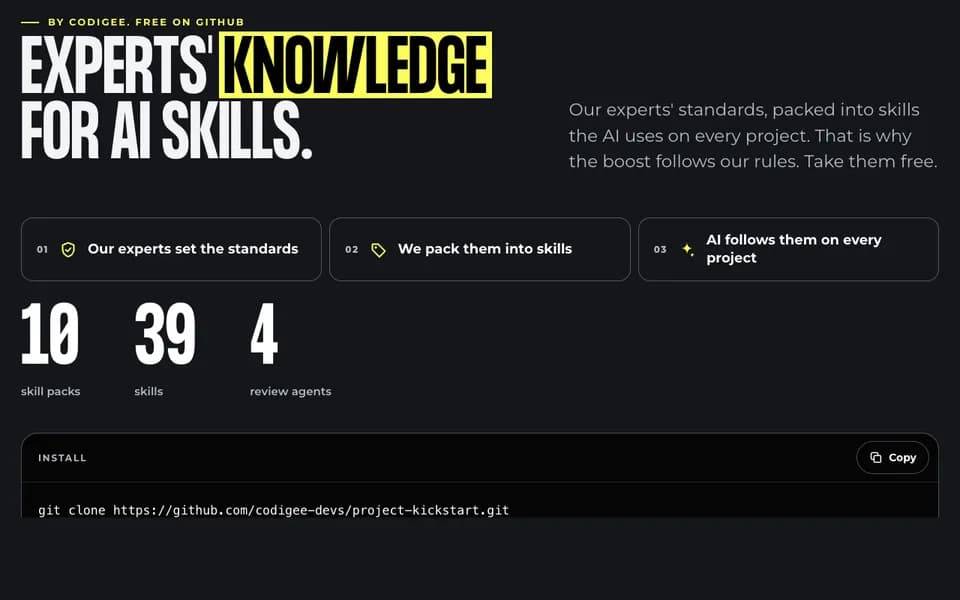
Our experts' standards, packed into skills the AI uses on every project. That is why the boost follows our rules. Take them free.
A skill is a short instruction file the AI reads before it does a certain kind of task. Think of the checklist a senior hands a new teammate: when it applies, what to check first, how we do it, and when the work counts as done.
Example: flutter-feature builds a new app screen the way our mobile team does: layers, state, tests, texts in translation files.
Where it helps: templates, tables and scripts.
git clone https://github.com/codigee-devs/project-kickstart.git
cd your-project
../project-kickstart/install.sh --all
Or only some packs: --pack init,mobile,backend,audits
No overengineering. No wasted time. Just straight-up execution.
 Or book a call with Eryk (opens the booking calendar)[email protected]