Apple rejected my app. Why, and what now?
Apple rejects apps for many reasons, but four guidelines catch most founders: 4.2 minimum functionality (the app feels like a website), 4.3 spam (it looks like a copy or a template), 2.1 app completeness (it is unfinished or crashes) and 5.1.1 data collection (privacy and accounts are not done). A rejection is not a verdict on your idea. Read the exact guideline in App Store Connect, fix that point, reply to App Review and submit a new build.
 By Eryk Kruk, CEO
Your app did not pass review, and the email quotes a guideline number you have never seen. It is not a verdict on your idea. It is a list of things to fix.
How often does Apple reject apps?
More often than most people think. In 2025 Apple reviewed 9,100,620 app submissions and rejected 2,093,244 of them. That is about one in four. In the same year, 387,087 submissions were approved after an earlier rejection.
Apple also says which rules were behind them. Performance, the section that holds 2.1 app completeness, was cited 1,354,418 times. Legal, which holds 5.1.1 data collection, 495,673 times. Design, which holds 4.2 and 4.3, 415,532 times. One rejection can cite more than one section.
Why was my app rejected under guideline 4.2 minimum functionality?
Because the reviewer thinks your app is a website in an app frame. Guideline 4.2 says an app should include "features, content, and UI that elevate it beyond a repackaged website". Guideline 4.2.2 adds that apps should not be mainly marketing material, web clippings, content aggregators or a collection of links.
This is the classic wrapper rejection. If your app started as a web app, for example in Lovable, Bolt or Replit, and now ships inside a native shell that loads the site, 4.2 is the most likely answer. A few native buttons on top of a website are not always enough. We compare a wrapper and a rebuild in Lovable app to the App Store: wrap it or rebuild it?.
What helps is an app with a job of its own:
- Native navigation. Tabs and back gestures that behave like iOS, not like a browser.
- Phone features where they fit. Camera, location, push, offline use. Only the ones your users need.
- No dead ends. When the network drops, the app says what happened instead of showing a blank page.
Google Play has a similar rule. Its minimum functionality policy says: "We do not allow apps that only have limited functionality and content." Its spam policy also bans apps whose main purpose is a webview of a website without the site owner's permission.
What does 4.3 spam mean if I did not copy anyone?
Guideline 4.3 covers two things. First, many copies of the same app under different Bundle IDs, such as one app per city. Second, apps that are "indistinguishable from what's already widely available".
Apple names categories it already has plenty of, such as dating, flashlight, wallpaper, simple timers and fortune telling. A new one needs a meaningfully different experience. Guideline 4.2.6 adds that apps made from a commercial template or app generation service are rejected unless the content owner submits them.
In 2025 Apple rejected over 371,000 submissions that copied other apps, were spam or misled users. If you got 4.3, show the reviewer what your app does that others do not, in the app itself and in your screenshots.
What does guideline 2.1 app completeness ask for?
A finished app that works on a real phone. Guideline 2.1 asks for a final version with working links and no placeholder text, tested on a device before you submit. Apps that crash or show obvious technical problems are rejected.
The most common 2.1 trap is simple. Your app has a login, and the reviewer cannot get in. Apple asks you to include demo account details and, in its own words, "turn on your back-end service!". If you sell in-app purchases, they must be visible and working during review too.
What does 5.1.1 data collection and storage require?
Clear rules for your users' data, inside the app. In 2025 Apple rejected over 443,000 submissions for privacy violations. Guideline 5.1.1 asks for:
- A privacy policy linked in App Store Connect and inside the app, saying what you collect, why, and how people can ask for deletion.
- Consent before you collect user or usage data, and clear purpose strings when the app asks for the camera or location.
- Account deletion inside the app if people can create an account. Deactivating the account is not enough.
- No forced login when the app has no real account-based features.
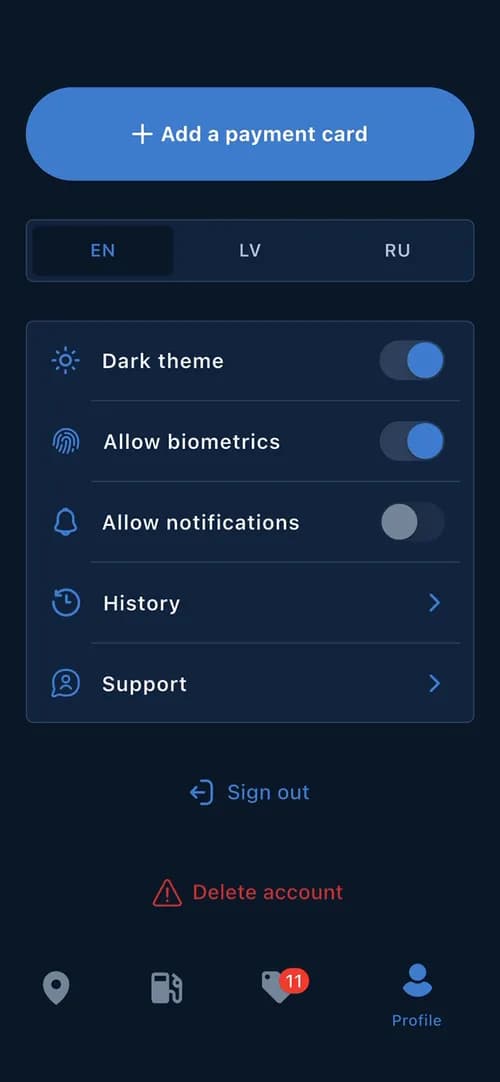
These fixes are rarely hard, just easy to forget in a quick prototype. In CrossChem, the app we built for paying for AdBlue at the pump, deleting the account is one button in the profile screen.
What should I do after the rejection email?
Work through it in this order, and answer the exact point the reviewer raised.
- Step 1Read the full message in App Store Connect. Note the guideline number and any screenshot.
- Step 2Find the cause in the app, not just in the sentence. Test it the way a reviewer would.
- Step 3Fix it and build a new version. Do not resubmit the same build.
- Step 4Reply to App Review: what you changed, where to find it, and a working demo account.
- Step 5Still unclear? Ask in the same reply. You can also request a call with App Review.
- Step 6Sure your app complies? Then appeal to the App Review Board, once per rejection.
Apple says it reviews at least 50% of submissions in under 24 hours and 90% in under 48 hours, so each round is short. A build that only changes the description usually comes back with the same answer.
If your app is already live and only a bug fix was rejected, ask for a bug fix submission. Apple does not delay bug fixes over guideline issues, except legal or safety ones, if you plan to fix the issue in your next version.
Should I fix the app or rebuild it?
Not always a rebuild. Missing account deletion, an empty privacy policy or a broken demo login are fixes of hours or days. A 4.2 rejection of a web wrapper is different. There, the app usually needs real native parts, and sometimes a native rebuild is the honest answer.
Our rule is simple: keep what works, rebuild native where it must be. FishPRO is a good picture of what reviewers expect: native maps, a catch log with photos and GPS, Apple and Google sign-in, and subscriptions in both stores. It went from the first talk in April to both stores in June.
If you are not sure which case you are in, the App Audit costs $5-8k and ends with a fixed plan: what to keep, what to rewrite and the price before any rebuild. If your app started as an AI prototype, Prototype to Store takes it to both stores. Every build starts from $15k, at a fixed price per milestone, and you can stop after any milestone. See all prices on our pricing page.
We use AI to move faster and to test every build. Codigee experts review every line before it ships. What usually blocks AI-built apps is in I built my app with AI. What stops it from reaching the App Store?.
Common questions
01How long does App Review take after I resubmit?
Apple says it reviews at least 50% of submissions in under 24 hours and 90% in under 48 hours. A new build goes through the same review.
02Can I appeal an App Store rejection?
Yes. If you believe your app follows the guidelines, you can appeal to the App Review Board. Apple asks you to reply to the rejection in App Store Connect first, and to send only one appeal per rejected app.
03Will a website wrapper ever pass App Store review?
Sometimes, but not always. Guideline 4.2 asks for features, content and UI beyond a repackaged website. The more your app does that the site cannot, the better.
04Does Google Play reject wrapper apps too?
Yes, it can. Google Play does not allow apps with only limited functionality and content, or apps whose main purpose is a webview of a website without the owner's permission. New personal developer accounts must also run a closed test with at least 12 testers for 14 days before going live.
05How much does it cost to fix a rejected app?
It depends on the cause. Account deletion or a demo account are quick fixes. If you are not sure, our App Audit costs $5-8k and ends with a fixed plan and a price.