Museum audio guide in 2026: devices, apps or your own AI guide?
Your audio guide devices are wearing out, or visitors keep asking for a guide in their language. A museum audio guide in 2026 comes in three forms: handheld devices you rent out, a guide on a ready-made subscription platform, or your own guide app on visitors' phones. We put the 3-year costs in one table, with the assumptions written out, show who each option fits and what your own guide on our Museo platform includes.
 By Eryk Kruk, CEO
 Museo: scan
 Museo: narration
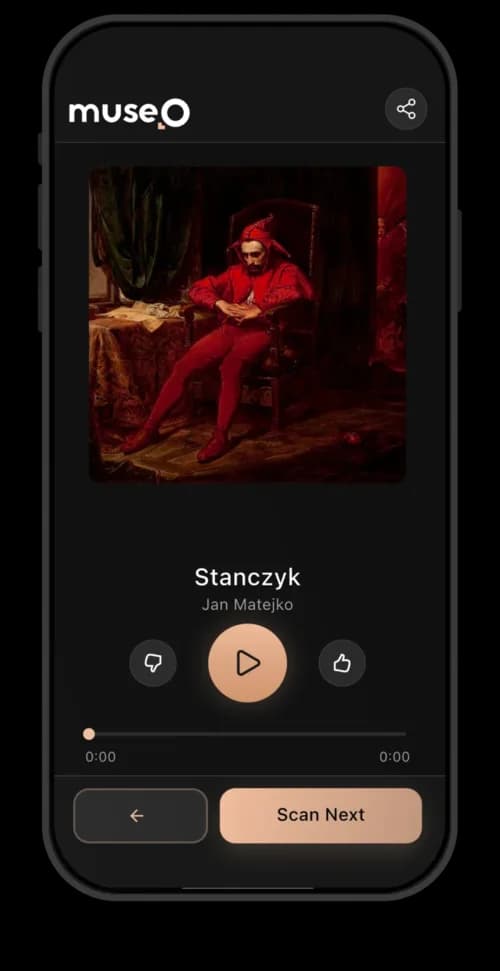 Museo: artwork
Maybe the batteries in your audio guide devices no longer last a full day. Maybe foreign visitors ask for a language you do not have, and the supplier has just sent a quote for a new fleet. Then someone at the meeting asks: "Why not just an app?" This article answers that question with numbers: what each option costs over 3 years, how much staff time it takes, and which one fits your museum.
Short answer: a museum audio guide today is one of three things: handheld devices you rent to visitors, a tour on a ready-made subscription platform, or your own guide app. Devices cost the most to start and to run. A platform is the quickest start, but the guide is rented, not yours. Your own app costs a one-off build and is the only option where the app, the content and the visitor data all stay with you.
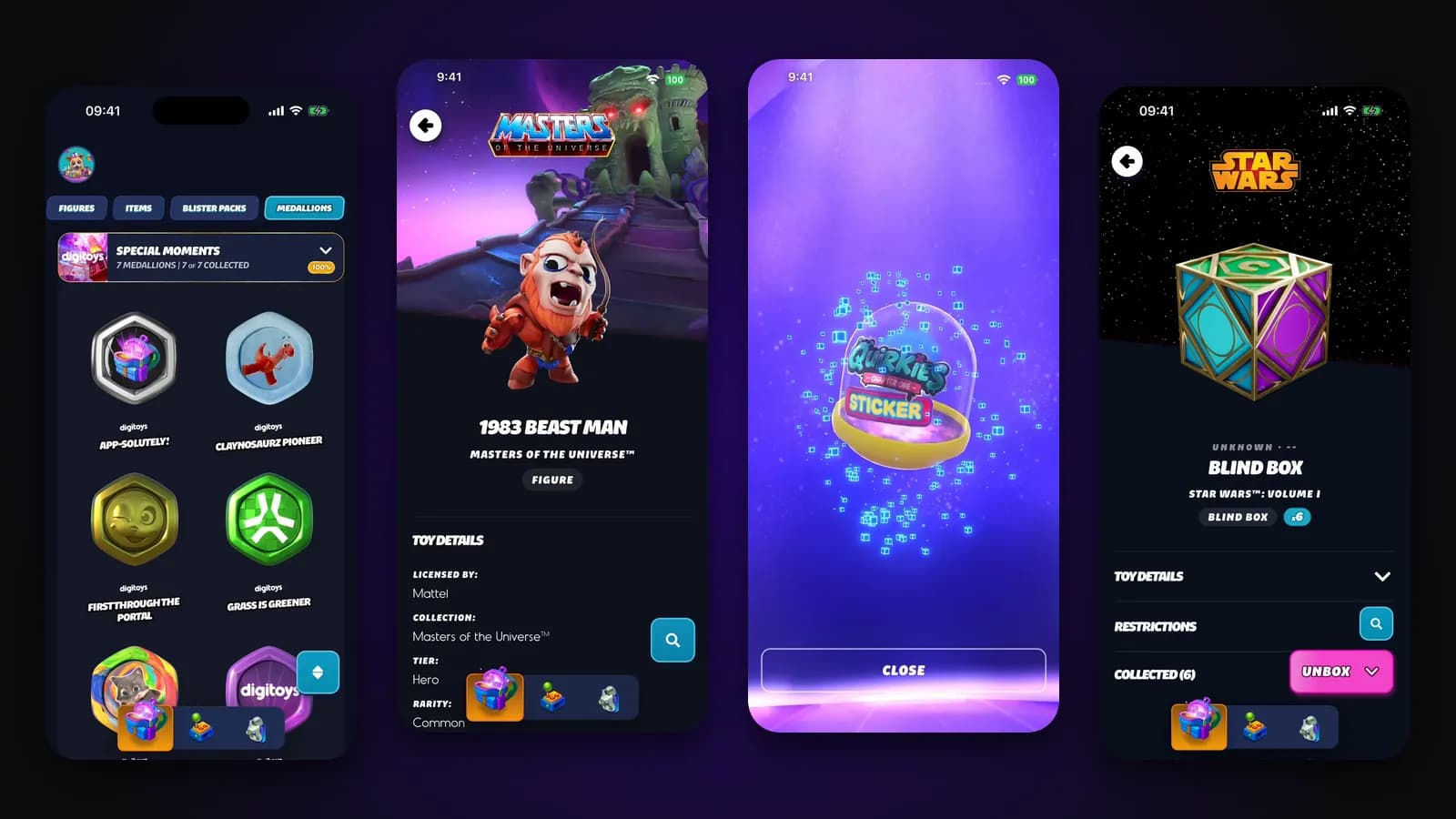
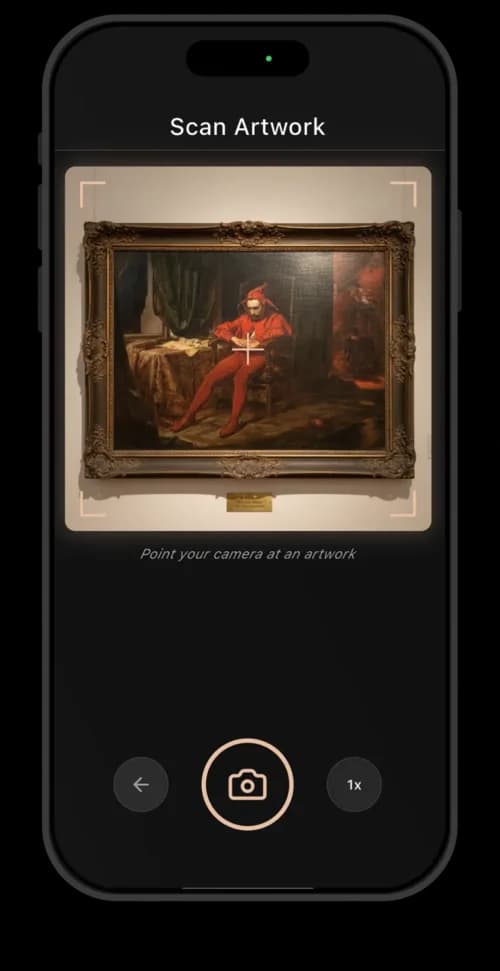
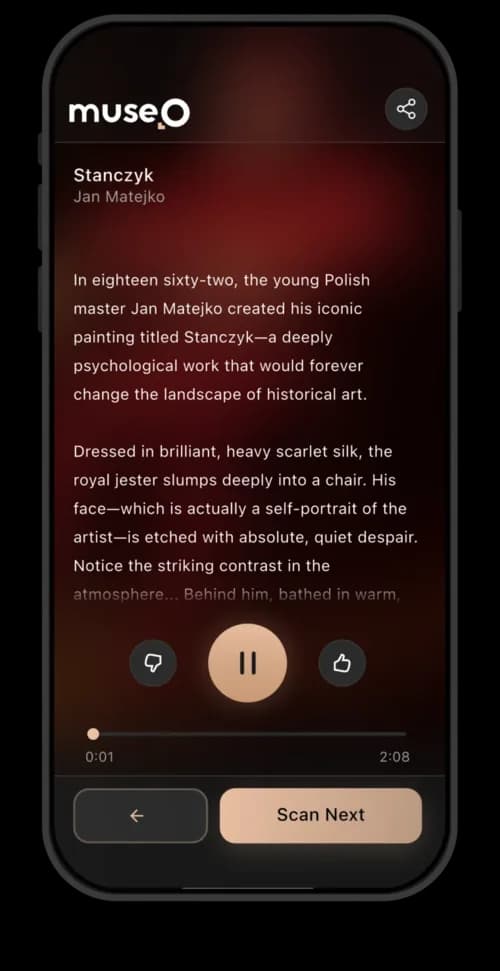
We write this from a live product, not a brochure. We built Museo, an AI museum guide app that is live in the App Store and Google Play: the visitor photographs an artwork, the app recognizes it in about 100 ms and narrates it in the visitor's language. A museum's own guide on Museo takes about 2 months and starts from about $20,000. Below we show where that sits next to devices and platforms, and when each one is the better fit.
Visitors still use audio guides. The Louvre rents its guide for EUR 6 and the Kröller-Müller Museum for EUR 2.50 (as of November 2026). The Met in New York says its audio guide draws 250,000 users a year, and it relaunched the guide with a new design in September 2013 (The Met, Improving the Audio Guide). The real question for a museum is not whether to offer one, but in which form.
Devices, a platform or your own app: which three audio guide options do you have?
In short: you rent devices to visitors, you put your tour inside someone else's app, or you publish your own app. A museum audio guide system is anything that plays recorded commentary for a stop in the exhibition. The three forms differ in who owns the hardware, who owns the content and who sees the data.
- Handheld devices. The museum buys or leases a fleet of players, hands them out at the desk, charges and cleans them, and usually charges a rental fee. The visitor types a number, or the device starts the right commentary by itself near a marker next to the exhibit.
- A ready-made subscription platform. The museum uploads its tours to an existing guide app or web app and pays a yearly subscription. Visitors use their own phones. A web app is a website that behaves like an app: it opens in the phone's browser from a link or a QR code, with nothing to install.
- Your own guide app. The museum has its own app in the App Store and Google Play, under its own name. In the version we build on Museo, the visitor photographs the artwork, and the app recognizes it and narrates it in the visitor's language.
Many museums mix them: an app for most visitors and a few devices at the desk for people without a smartphone or with a hearing aid. Think of it like a restaurant menu: the printed menu stays for those who want it, but most guests already read it on their phone.
Audio guide devices: why the purchase price is the smallest cost
In short: audio guide devices cost the most up front and the most to run, because the museum owns everything: the devices, the chargers, the recordings and the desk that hands them out. Suppliers quote per project and rarely publish prices, so the best public numbers come from tenders.
Public tenders show the scale. In 2023 the Toruń District Museum paid 201,391.59 PLN gross (about $57,000 at 3.5 PLN per USD) for 50 audio guide devices with recordings in several versions, 30 radio markers and 5 induction loops (award notice). A radio marker is a small transmitter next to an exhibit that tells the device which commentary to play. An induction loop is a wire loop that sends sound straight to hearing aids. In 2026 the National Museum in Kraków awarded 866,627.25 PLN gross for its audio guide system (award notice). Neither price is a list price: each covers a different scope.
The purchase is only the start. Devices bring costs that never appear in the quote:
- Staff time. Someone hands out devices, takes deposits or IDs, explains the buttons and collects them at the exit.
- Charging and cleaning. Every device is charged and disinfected after every visitor, with headphones or covers replaced.
- Repairs and replacement. Batteries wear out, devices get dropped or leave with a visitor. Ask the supplier for the warranty and the price of a spare.
- Content updates. A new exhibition or a new language is a new recording session and a new upload to every device.
Audio guide rental brings some of it back. The Louvre charges EUR 6 (Louvre, hours and admission), the Kröller-Müller Museum EUR 2.50 (Kröller-Müller, audio tour), both as of November 2026. Your income is the fee times the number of visitors who rent. Count that number for a month before you put it in a business case.
Devices still make sense in some places: where many visitors have no smartphone, where an induction loop for hearing aids is required, or where the tender already specifies hardware.
What this means for you. With devices, the purchase price is the smallest surprise. The real cost is staff hours at the desk every open day, and those never show up in the supplier's quote.
A ready-made subscription platform: a quick start, but a rented guide
In short: a ready-made platform gives you an audio guide inside an existing app or a web page for a yearly subscription, and you upload your own content. You get the quickest start. In return you rent the guide: it lives in someone else's app or a browser page, within the limits of your plan, and your visitor data stays on the platform's terms.
Think of it as renting a furnished flat. You move in fast and pay no build cost, but you cannot move the walls, the landlord sets the rules, and when you leave, the furniture stays. Plans usually differ in how many tours and objects you can publish and how much of your own branding you get, so read the limits of the plan before you count on it.
Before you sign with any platform, get a written answer to four questions:
- Brand. Does the visitor download your app, the platform's app, or open a web page?
- Data. Can you export visitor data, and what does the platform do with it?
- Languages. Which languages are included, and who writes, translates and records the audio?
- Exit. If you leave after three years, do you keep the texts, the audio and the stats?
What this means for you. A platform saves money and time in the first year. The risk sits at the end: you pay the subscription every year, you still do the content work yourself, and if you leave, you may lose your tours, your audio and your visitor data. Ask the exit question before you sign, not after three years.
Your own guide app on Museo: a photo instead of a number, your language, your data
In short: your own guide app does what platforms and devices do not. Visitors take a photo instead of typing numbers or scanning QR codes, they hear AI narration in their own language, you own the analytics, and the app carries your museum's name in the App Store and Google Play. All of this already works in Museo, so your project starts from a live product, not from a blank page.
- Recognition from a photo. The visitor points the camera at an artwork, and a recognition model finds it in about 100 ms. A recognition model is software trained on photos of your collection, so it can tell which work the camera sees. Think of a guard who has walked your rooms for years: show them any painting, even from the side, and they know which one it is. The model does that for every visitor at once. No numbers to type, no QR stickers on the walls.
- AI narration in 20+ languages. AI writes the text and a synthetic voice reads it, in the visitor's language, and your staff checks it before it goes live. The app's interface comes in 28 languages.
- Narration styles. The same work can be told as a classic guide, for experts, for kids or in an accessibility mode, so one visit fits a family and an art historian.
- Accessibility. The app meets WCAG 2.1 AA, the common international accessibility standard. In practice, it works with screen readers that read the screen aloud and with larger text, and it has an accessibility mode for blind and low-vision visitors.
- Offline mode. Visitors can download a whole museum pack before the visit, so the guide works in rooms with no signal.
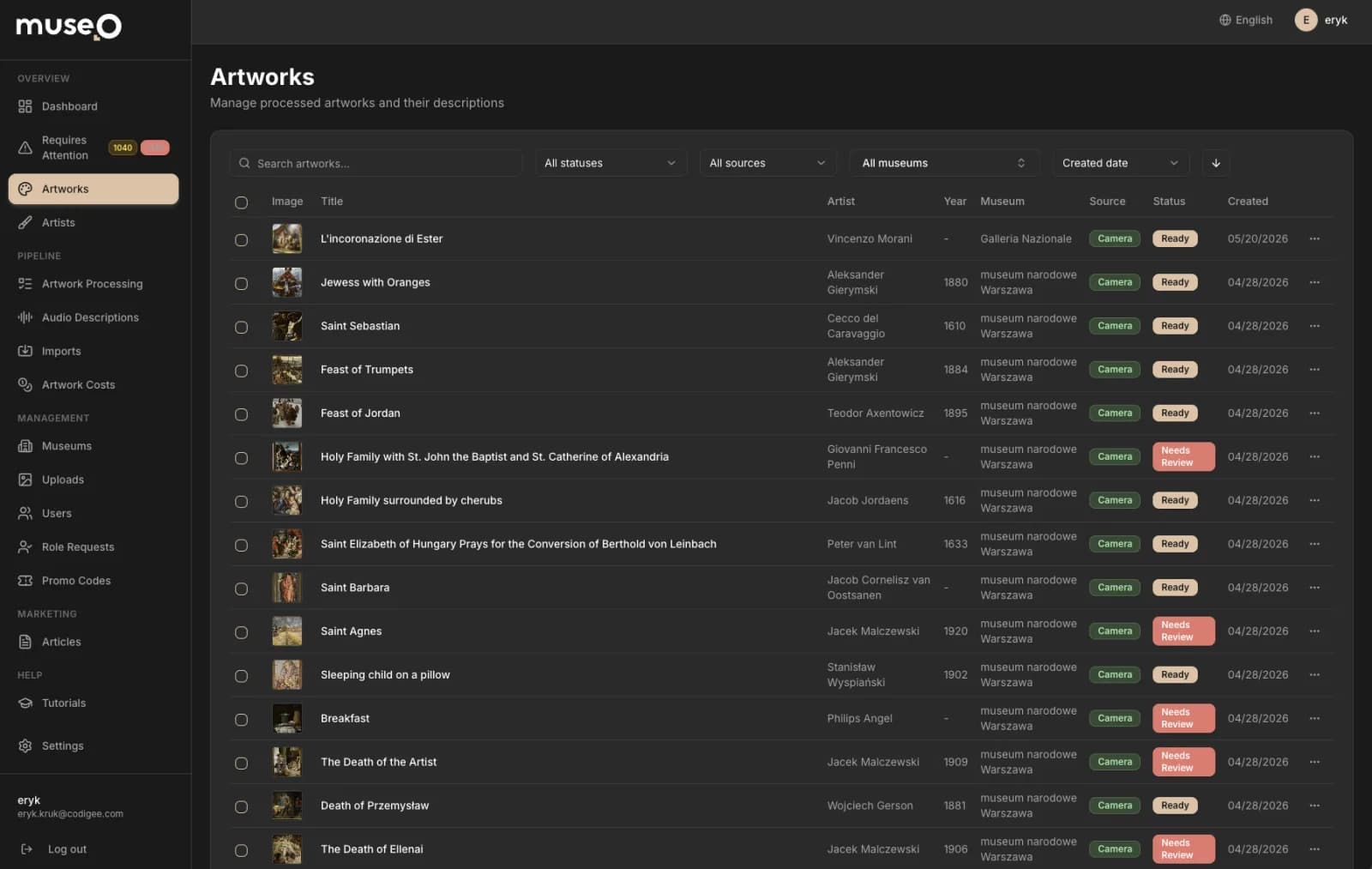
- Analytics. The admin panel is the web page where your staff edit content and see the numbers. It shows scan counts, the most viewed works and heatmaps: a floor plan colored by how many people stop in each room, so you see which rooms draw people and which they skip. Devices never told you that.
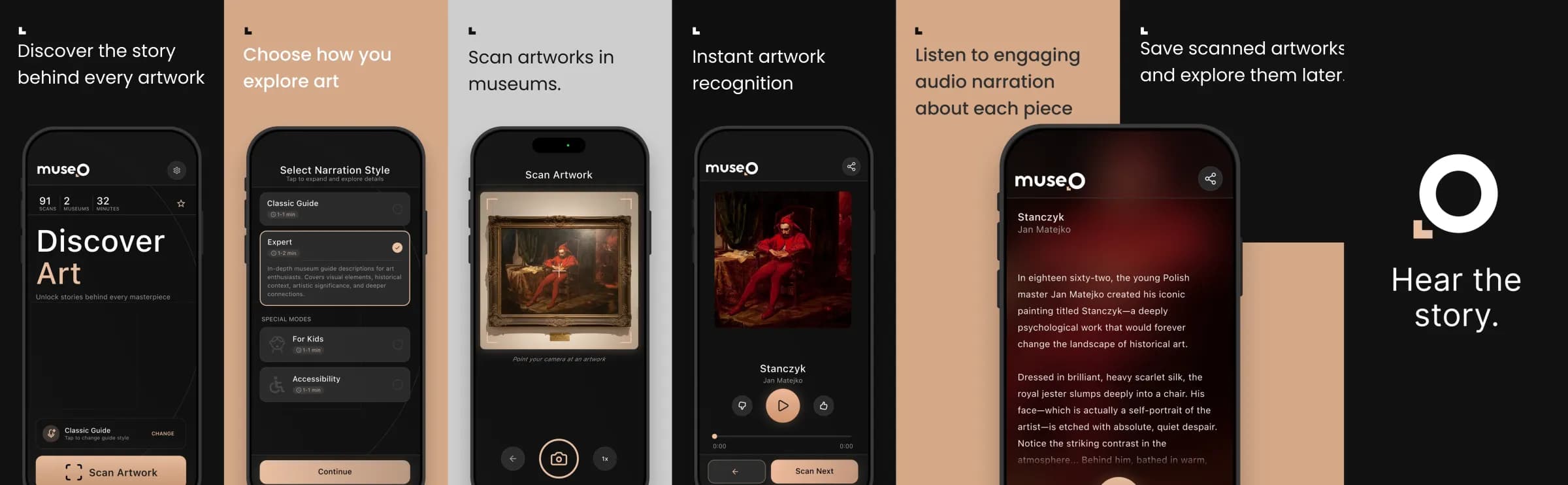
The Museo case: from a museum's problem to a live guide
Museo is our own product, built for a problem most museums know: going digital meant months of curator writing and voice-actor sessions, language by language, with no IT team to run the software and no idea how visitors move through the rooms.
- ProblemRented devices, months of recordings in every language, no visitor data
- What we didOne connected product of 6 parts: Flutter apps for iPhone and Android, an admin panel one curator runs from a browser, and an AI pipeline that recognizes works, drafts the narration and checks it
- ResultFrom concept to a live product in about 3 months, in the App Store and Google Play, with recognition in about 100 ms and narration in 20+ languages
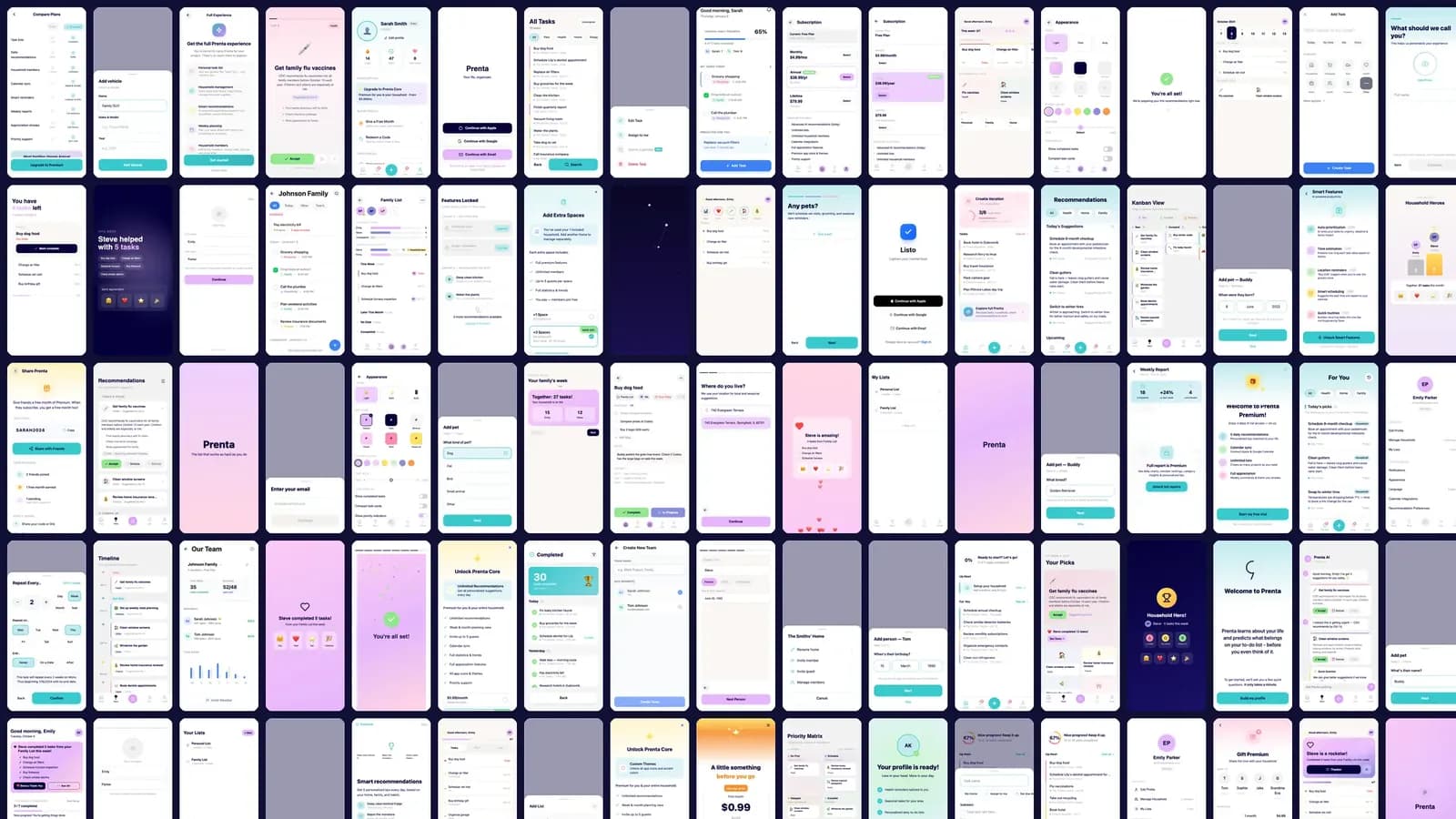
Flutter is Google's toolkit for building the iPhone and Android app from one code base, which is why one team ships both at once. An AI pipeline is a chain of automatic steps, like an assembly line: photo in, recognized work, draft text, voice, check, out. Museo is live in the App Store as "Museo: Scan Art, Hear Story" and in Google Play (App Store listing). Before writing the app, we tested the screens first: 49 home screen variations, 30+ screens and 5 narration modes, described in how we prototyped Museo.
How an app knows which room a visitor is in is another topic: photo recognition does not need it, so there is no hardware to buy for the guide itself.
What this means for you. Your own app is a one-off build instead of a fleet of devices or a subscription forever. The content work shrinks from studio sessions to review time, and the app, the texts and the visitor data stay yours. It also helps that one team builds the app, the admin panel and the AI pipeline together: nothing gets lost between three vendors, as we explain in what handoffs between app vendors cost you.
What each option costs over 3 years: devices vs platform vs your own app
In short: devices cost the most: about $57,000 at the start in one public tender, plus staff time every open day. Your own guide app on Museo comes to about $29,000 over 3 years, build and running costs included. A subscription platform has the lowest entry cost, but you pay it every year and still produce the content yourself. The table puts the three side by side, with the assumptions under it.
Assumptions. Devices: the Toruń tender above, 201,391.59 PLN gross at 3.5 PLN per USD, with no staff costs or rental income counted, because they depend on your museum. Platform: no figure, because plans and prices differ, so ask for a written 3-year quote. Your own app: the build from about $20,000, plus store accounts, plus one GPU kept warm 10 hours a day, every day, at Modal's list price for an L4 GPU ($0.000222 a second). A GPU is the kind of processor that AI models run on, rented from a cloud provider by the second. Keeping one warm works like a taxi waiting with the engine running: you pay for the hours it waits, not only for the rides. A GPU that sleeps when the museum is closed costs less.
What this means for you. The three columns are three different deals. Devices: the most money up front, plus staff time every day. A platform: a small yearly fee, the least control and the content work still on your side. Your own app: about half of the device purchase price over 3 years, then mostly review time, and you own the result.
After launch, every app we build has a 6-month guarantee. After that you choose: our Care plan (from $2,000 a month, see Codigee pricing) or updates ordered when you need them, for example once a year before new iOS and Android versions. What goes into any app budget is in How much does it cost to build an app in 2026?.
Content is the biggest cost: how AI narration with curator review cuts it
In short: content costs more than the technology in all three options. That means the texts, the translations and the recordings, for every stop, in every language, again for every new exhibition. A museum with 200 stops in 5 languages has 1,000 recordings to write, check, record and keep up to date. AI narration with human review turns most of that work into editing.
In Museo, a staff member photographs the artwork and its label, and AI drafts the description and the narration. Then speech recognition software, which turns speech back into text, listens to every clip, writes down what it hears and compares it with the script. A clip that does not match goes to a person. Nothing reaches a visitor until a curator approves it. It works like a newsroom: AI writes the fast first draft, and your curator is the editor who signs every page. AI does the production work. The museum keeps control of what is said.
Listen: one painting, narrated by Museo in three languages
This is what a visitor hears after pointing the phone at a painting. The recordings below come straight from Museo, for Sports on a Frozen River by Aert van der Neer (around 1660): the same narration in English, Spanish and Polish, written by AI and checked automatically before it reached the app. Each version runs about a minute and a half. Another language means another review of the text, not another studio session.

- English
- Español
- Polski
What this means for you. Whatever you choose, budget your team's time for content. On devices you pay for it in studio sessions, on a platform in your staff's hours, and in your own app on Museo in review time: a new language is a review, not a new recording contract.
How to choose: 7 questions to answer before you ask for a quote
In short: choose by your visitors, your languages and how much you want to own. Answer these seven questions with real numbers before you ask anyone for a quote, and the right option usually becomes clear.
- Visitors per year. How many, and how many would use a guide? Devices scale with the fleet, apps scale on visitors' phones.
- Languages. Two languages favor devices or a platform. Ten or more favor AI narration with review.
- Collection size. Tens of stops fit any option. Hundreds of works make recognition from a photo worth it.
- Staff. Who will hand out, charge and clean devices, or upload and update tours?
- Brand. Is a page inside someone else's app enough, or do you want your own app?
- Data. Do you need to know which rooms draw people, and to own that data?
- Public procurement. This is the formal tender a public museum must run before it buys above a set amount. In the EU, supplies and services above EUR 216,000 for most museums (2026-2027) need an EU-wide tender. National thresholds are lower: in Poland, 170,000 PLN net since January 2026.
Sources for the thresholds: Polish Public Procurement Office, EU thresholds 2026-2027, Polish government, deregulation. Check your own country's rules before you plan the purchase.
Explain it to your director in three sentences. "Devices cost the most and need staff every day. A platform is a quick start, but we rent the guide and our data sits in someone else's app. Our own app is a one-off build of about $20,000, then mostly review time, and the brand, the content and the visitor data stay ours." If those three sentences match your numbers, you know which quote to ask for.
Your own guide on Museo in about 2 months: what is included and how it runs
In short: you get a guide app under your museum's own name, built on the Museo platform, in about 2 months from about $20,000, by the same senior team that built Museo. Recognition, narration, accessibility and the admin panel already work in a live product, so the project time goes into your collection, your content and your brand. That is a starting point, not a quote: the final price depends on your collection, languages and integrations.
What is included
- Your app in both stores. iPhone and Android, with your museum's name, colors and icon, published in the App Store and Google Play.
- Recognition from a photo. Every work on display photographed in your rooms and indexed, so the app knows it from a visitor's photo.
- AI narration in 20+ languages. AI drafts the text, your curator approves it, then it is translated and voiced, in narration styles for different visitors.
- Accessibility. Built to WCAG 2.1 AA, as Museo is.
- Admin panel and analytics. Curators edit works and texts themselves. Scan counts, most-viewed works and visit heatmaps show how people move through the exhibition.
- Hardware only if you need it. Beacons, QR codes or NFC tags as a quoted add-on, after a walk through your rooms. A beacon is a small battery radio that tells the app which room it is in, and an NFC tag is a sticker the phone reads on touch, like a contactless card.
How the 8 weeks run
- Weeks 1-2Scope and collection import. Works, rooms, languages and narration styles agreed and frozen. Collection data imported, brand brief agreed.
- Weeks 2-4Content and translation. AI drafts, your curator approves the source texts, then translation and narration in every language.
- Weeks 3-5Recognition. Photos of every work in the rooms, the index built and tested on real phone photos.
- Weeks 4-6Your app. Name, icon, colors, home screen, store listings and accessibility checks.
- Week 7Testing on site. Real phones, real light, every main language, a screen reader user. Fixes the same week.
- Week 8Store release. App Store and Google Play review, a short briefing for front-of-house staff, launch.
The museum supplies collection data, the right to photograph the works, one person who approves texts and time in the rooms. Projects like this rarely slip because of technology. They slip while someone waits for an export or an approval. You get a fixed price per milestone and a new build on your phone every week, so you see progress before you pay for the next step. How we run every project, from the first call to the stores, is on how we work, step by step.
Why museums build their guide with us: a senior team that already shipped one
In short: pick a team that has a museum guide live in the stores, can show it recognizing real artworks and gives you a fixed price before you sign. We pass that test with Museo, and a small senior team is exactly why we can do it in about 2 months.
- Proof you can try, not slides. Museo is live in the App Store and Google Play. Try it yourself in front of a painting, with recognition in about 100 ms, narration in 20+ languages and WCAG 2.1 AA accessibility.
- Seniors on your project, no layers in between. You talk directly to the engineers and designers who build your guide, with no account managers relaying messages. They are the people who took Museo from concept to a live product in about 3 months and worked out its design in 49 home-screen variations.
- One team for the whole product. The app, the admin panel and the AI pipeline come from one team under one contract, as they did in Museo's 6 connected parts.
- Predictable cost. A fixed price per milestone, a new build on your phone every week and your own store accounts from day one.
- Rated by clients. 5.0 on Clutch from 19 reviews, and Clutch 2026 awards for Top Flutter Developers Poland and Top App Development Company Poland.
Ask every team you talk to for the same things: a live app you can test in front of a real work, a test on a sample of your own works before a full rollout, and a fixed price per milestone with hardware listed separately. We show you recognition on photos of 10 of your works before you commit. What we build for museums and other organizations is on app development for companies.
Common questions
01Do visitors still use audio guides?
Yes. The Met in New York says its audio guide draws 250,000 users a year, and the Louvre still rents its guide for EUR 6 as of November 2026.
02How much does a museum audio guide system cost?
It depends on the form. In a 2023 Polish tender, 50 devices with recordings cost about $57,000. A ready-made platform is a yearly subscription priced per plan, paid every year. A museum's own guide app built on Museo starts from about $20,000 and comes to about $29,000 over 3 years with running costs.
03Can visitors use their own phones instead of devices?
Yes, and most already carry one. With an offline mode, the guide works in rooms with no signal. Keep a few devices or a loaner phone and headphones at the desk for visitors without a smartphone.
04Is AI narration good enough for a museum?
With human review, yes for most collections. In Museo every clip is checked against its script automatically, and a curator approves it before visitors hear it. For a flagship tour with a famous voice, a studio recording can still be the better choice.
05Do we need a public tender for an audio guide?
Public museums usually do above the national threshold: in Poland 170,000 PLN net since January 2026. In the EU, supplies and services above EUR 216,000 for most museums need an EU-wide tender (2026-2027).
06How long does it take to launch your own guide app, and what is included?
A museum's own guide on our Museo platform takes about 2 months. It includes your app in both stores, recognition from a photo, AI narration in 20+ languages, WCAG 2.1 AA accessibility and an admin panel with analytics. Museo itself went from concept to a live product in about 3 months.
Was this article useful?
5.0 / 5 · 3 ratings